Mengapa Perbandingan Ini Bisa Dipercaya?
Kami membangun Chrobox, sebuah aplikasi timeboxing — jadi ya, aplikasi ini muncul di daftar ini. Namun perbandingan yang hanya memuji produknya sendiri tidak berguna bagi Anda. Di bawah ini, setiap aplikasi dinilai berdasarkan lima kriteria yang sama, dengan catatan jujur tentang di mana masing-masing aplikasi mengungguli yang lain, termasuk di mana kompetitor mengungguli Chrobox.
Apa yang Membuat Aplikasi Timeboxing Hebat?
- Penjadwalan tanpa hambatan — menambahkan time box seharusnya memakan waktu detik, bukan menit
- Representasi waktu visual — melihat hari Anda sebagai blok mengubah cara Anda merencanakannya
- Penegakan fokus — pengingat minimal; pemblokiran aplikasi jika Anda mudah terdistraksi
- Loop review — timeboxing hanya meningkat jika Anda membandingkan rencana vs. realita
- Harga yang wajar — Anda tidak seharusnya membutuhkan langganan $30/bulan hanya untuk merencanakan hari Anda
8 Aplikasi Timeboxing Terbaik di 2026
1. Chrobox — alur kerja timeboxing khusus terbaik (iOS, Android)
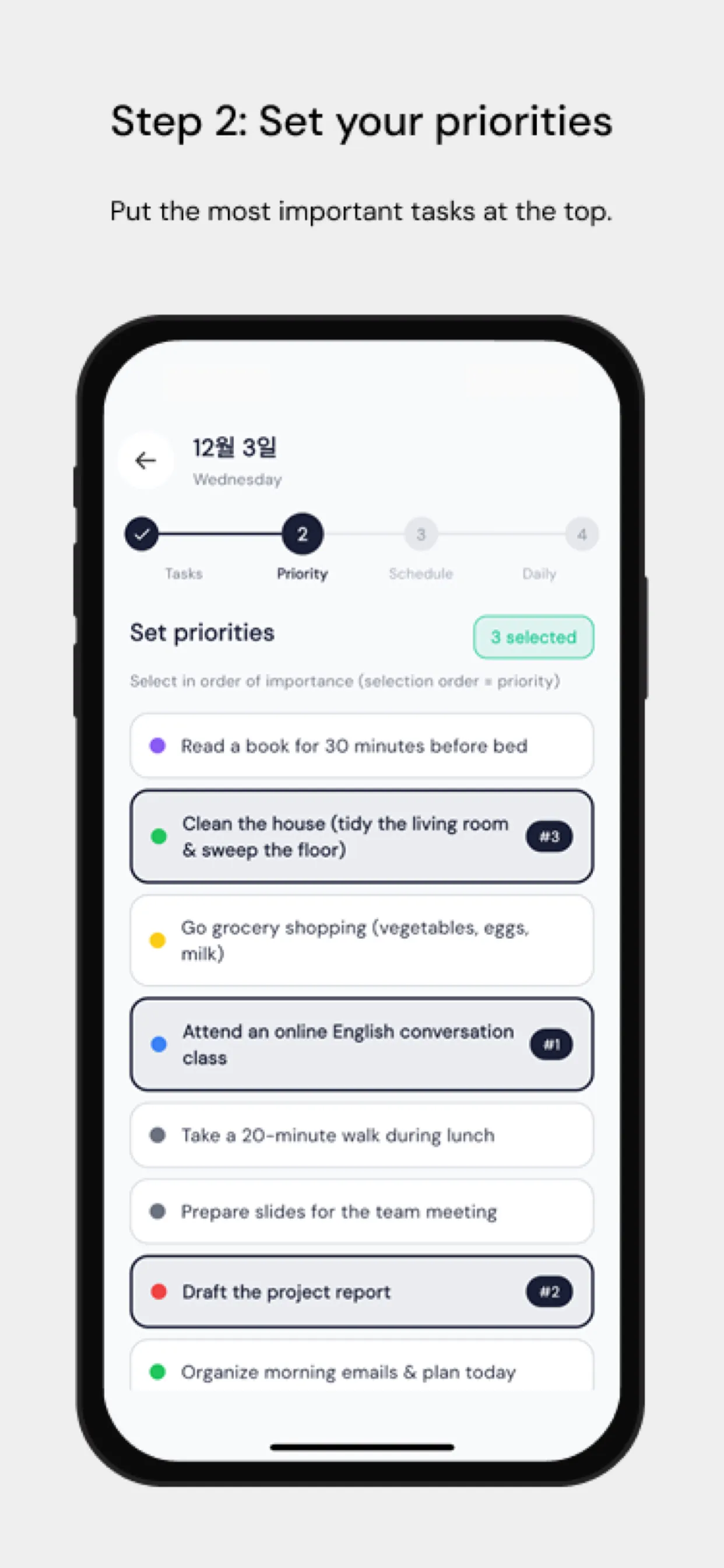
Chrobox dibangun di sekitar loop timeboxing penuh alih-alih kalender dengan fitur tambahan: brainstorming tugas, pilih prioritas, masukkan ke dalam box per jam pada timeline visual, lalu tutup hari dengan retrospeksi terpandu yang menjadi masukan untuk analisis AI mingguan. Ini juga salah satu dari sedikit perencana yang mengaitkan pemblokiran aplikasi dengan time box Anda — aplikasi pengganggu terkunci tepat selama deep work yang direncanakan.
Kekuatan: loop rencana→fokus→review lengkap, pemblokiran aplikasi terkait dengan box, widget dan timer Live Activity, 54 bahasa Kelemahan: hanya mobile (tanpa aplikasi desktop), tanpa fitur tim Harga: paket gratis; Pro (uji coba gratis 3 hari) menambahkan pemblokiran aplikasi, widget, dan AI — langganan atau pembelian seumur hidup satu kali
2. Sunsama — terbaik untuk profesional dengan kalender padat (Web, desktop, mobile)
Sunsama unggul dalam menarik tugas dari Gmail, Slack, Trello, dan Asana ke dalam rencana harian yang Anda seret ke kalender Anda. Ritual perencanaan harian terpandunya sangat baik. Trade-off-nya adalah harga — diposisikan untuk profesional yang biayanya ditanggung perusahaan.
Kekuatan: integrasi kelas terbaik, perencanaan terpandu yang tenang Kelemahan: sekitar $16–20/bulan, tanpa tingkat gratis selain uji coba Harga: hanya langganan
3. Motion — terbaik untuk penjadwalan otomatis AI (Web, mobile)
Motion membalikkan model tersebut: Anda memasukkan tugas dan tenggat waktu, dan AI-nya menjadwalkan hari Anda secara otomatis, menjadwalkan ulang ketika rapat berpindah. Kuat untuk kalender yang kacau, tetapi Anda melepaskan tindakan perencanaan yang disengaja — yang merupakan setengah dari inti timeboxing bagi banyak orang.
Kekuatan: penjadwalan ulang otomatis, kuat untuk minggu yang padat rapat Kelemahan: mahal, kurang disengaja dibanding timeboxing manual Harga: langganan premium, sekitar $30/bulan ditagih bulanan
4. TickTick — daftar tugas terbaik dengan timeboxing tambahan (semua platform)
TickTick terutama adalah pengelola tugas, tetapi tampilan timeline dan timer Pomodoro bawaannya membuatnya menjadi hybrid yang mumpuni. Jika Anda hidup dalam checklist dan hanya sesekali melakukan timeboxing, ini adalah nilai yang bagus.
Kekuatan: manajemen tugas yang sangat baik, premium terjangkau, semua platform Kelemahan: timeboxing hanya sekunder; tanpa ritual perencanaan atau loop review Harga: tingkat gratis yang solid; premium sekitar $36/tahun
5. Structured — kesederhanaan visual terbaik (iOS, Android, Mac, Watch, Web)
Structured mengubah hari Anda menjadi timeline vertikal yang bersih dan disukai karena kurva belajarnya yang lembut. Bagus untuk pelajar dan pemikir visual; kurang lengkap jika Anda menginginkan statistik atau penegakan.
Kekuatan: timeline yang indah, mudah dimulai, opsi harga yang ramah untuk pembayaran sekali Kelemahan: minim analitik, tanpa pemblokiran aplikasi Harga: tingkat gratis; langganan Pro atau seumur hidup
6. Tiimo — terbaik untuk ADHD dan perencana neurodivergen (iOS, Android, Mac, Watch)
Tiimo dirancang bersama dan untuk pengguna neurodivergen: jadwal visual, rutinitas berbasis ikon, dan peringatan transisi lembut alih-alih tanda terlambat yang menimbulkan rasa bersalah. Jika perencana konvensional berulang kali gagal untuk Anda, mulailah di sini atau dengan mode fokus Chrobox.
Kekuatan: desain yang benar-benar inklusif, visualisasi rutinitas Kelemahan: lebih ringan pada analitik produktivitas klasik Harga: tingkat gratis terbatas; Pro tahunan menyertakan uji coba 7 hari (bulanan tanpa uji coba)
7. Google Calendar — opsi gratis terbaik yang sudah Anda miliki (semua platform)
Timeboxing manual di Google Calendar berfungsi: buat blok, beri kode warna, atur notifikasi. Ini tidak berbiaya apa pun dan tersinkronisasi di mana saja. Yang hilang adalah semua hal di sekitar kalender — penangkapan tugas, prioritas, penegakan fokus, dan bentuk review apa pun.
Kekuatan: gratis, universal, dapat dibagikan Kelemahan: tanpa alur kerja tugas, tanpa alat fokus, mudah diabaikan Harga: gratis
8. Todoist — terbaik untuk pengguna GTD yang menambahkan blok waktu (semua platform)
Tampilan kalender Todoist dan sinkronisasi dua arah dengan Google Calendar memungkinkan pecinta checklist bereksperimen dengan time blocking tanpa meninggalkan pengelola tugas mereka. Seperti TickTick, lapisan timeboxing-nya tipis — tetapi sistem tugas yang mendasarinya bisa dibilang terbaik di kelasnya.
Kekuatan: penangkapan dan pengorganisasian tugas kelas dunia Kelemahan: timeboxing adalah tambahan, bukan loop inti Harga: tingkat gratis; Pro sekitar $4–5/bulan
Tabel Perbandingan
| Aplikasi | Loop inti | Pemblokiran aplikasi | Review/retrospeksi | Tingkat gratis | Platform |
|---|---|---|---|---|---|
| Chrobox | Timeboxing penuh | ✅ | ✅ retrospeksi AI | Gratis + Pro (uji coba 3 hari) | iOS, Android |
| Sunsama | Perencanaan harian | ❌ | ✅ ritual shutdown | hanya uji coba | Web, desktop, mobile |
| Motion | Penjadwalan AI | ❌ | ❌ | hanya uji coba | Web, mobile |
| TickTick | Daftar tugas + timeline | ❌ | ❌ | ✅ | Semua |
| Structured | Timeline visual | ❌ | ❌ | ✅ | iOS, Android, Mac, Watch, Web |
| Tiimo | Rutinitas visual | ❌ | ✅ mood/refleksi | Gratis terbatas | iOS, Android, Mac, Watch |
| Google Calendar | Blok manual | ❌ | ❌ | ✅ | Semua |
| Todoist | Tugas + kalender | ❌ | ❌ | ✅ | Semua |
Mana yang Harus Anda Pilih?
- Anda menginginkan metode timeboxing lengkap, termasuk penegakan fokus: Chrobox
- Pekerjaan Anda hidup di Slack/Asana/email dan anggaran bukan masalah: Sunsama
- Kalender Anda meledak setiap hari dan Anda ingin AI yang mengatasinya: Motion
- Anda kebanyakan hanya butuh daftar tugas: TickTick atau Todoist
- Anda ingin memulai dengan cara paling lembut: Structured
- Perencana konvensional tidak pernah cocok untuk Anda: Tiimo
- Anda ingin tidak mengeluarkan biaya apa pun: Google Calendar
Kesimpulan jujurnya: aplikasi mana pun dari ini mengalahkan tanpa sistem sama sekali. Pilih yang loop intinya cocok dengan cara kerja otak Anda, dan beri waktu dua minggu penuh sebelum menilai.